Memes
Make a meme about a real customer moment
A useful place to start a brand meme is a small, familiar moment: opening another spreadsheet, hunting for a missing file, or watching someone repeat a task by hand. The situation supplies the joke. Your product only needs to enter if it makes that joke clearer.

Write the situation before choosing the template
List a few things your audience does, says, or gets frustrated by in the context of your product. Use actual customer questions or your own observations. Avoid turning an assumption about all customers into a statement of fact.
Choose one situation that can be understood in a sentence. If you need a paragraph of background to explain why it is funny, look for a smaller moment. A contrast between what someone expects and what actually happens gives you a simple starting structure.
Match the visible action to the caption
Look at the whole clip, not just its thumbnail. Does it show confusion, celebration, disbelief, or an activity that belongs in the scene? A caption about finally finishing a task needs a different visual from one about discovering another problem.
In Viraal, choose Memes in Studio and select a template or inspiration. Review the background as well as the reaction. A busy image can compete with a caption, while a relevant background can establish the setting without another line of text.
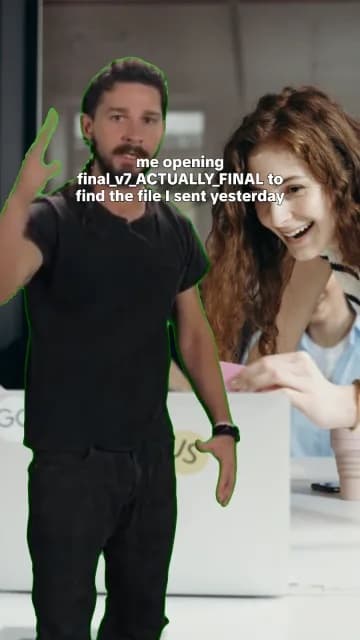
This example was rendered through Viraal’s green-screen meme compositor. The office background establishes the file-sharing situation, the reaction carries the frustration, and the caption stays on one customer moment.
Keep one joke on screen
Read the caption aloud, then remove the words you added only to explain the joke. Keep the specific detail that makes the situation recognizable. If the caption contains two separate setups, save one for a second post.
A product mention is optional. Adding a brand name to the final line can interrupt an otherwise natural sentence. If the product belongs in the joke, give it a clear role. Otherwise, let the post focus on the customer moment rather than squeezing in a sales pitch.
Preview the timing and the edges
Play the draft all the way through. Check that the expression you chose is visible while the caption is on screen, and that text does not cover the part of the reaction that makes the joke work. Review the background and audio together before exporting.
Finally, ask someone who did not write the caption to describe the situation. If they need your explanation, revise the setup. This is a clarity check, not a prediction of reach: you are making sure the post communicates the idea you intended before it leaves the editor.
- Play the chosen template until you find the frame where the reaction reads clearly.
- Keep the caption away from the face and the important gesture.
- Check the chroma-key edge against the selected background.
- Export, then watch the full loop once without pausing.